UAF CGPA Calculator
Are you a student at the University of Agriculture Faisalabad (UAF) looking for an easy way to calculate your CGPA? The UAF CGPA Calculator is a reliable tool for quickly and accurately determining your Cumulative Grade Point Average. This guide explains how to use the UAF CGPA Calculator to track your academic performance and stay on top of your studies effortlessly.
Select Number of Semesters
How many semesters do you want to calculate CGPA for?
Understanding CGPA
CGPA, or Cumulative Grade Point Average, represents the overall academic performance of a student throughout their degree program at UAF. Unlike GPA which calculates performance for a single semester, CGPA provides a comprehensive view of academic achievement across all completed semesters. The UAF grading system typically uses a 4.0 scale, where each letter grade corresponds to specific grade points.
At UAF, the grading system follows international standards with slight modifications to suit the local educational framework. Students receive letter grades ranging from A+ to F, with each grade carrying specific grade points. The calculation involves multiplying grade points by credit hours for each subject, summing these values, and dividing by the total credit hours attempted.
Why Use the UAF CGPA Calculator?
- Accurate and Reliable
The Calculator strictly follows the University of Agriculture Faisalabad grading rules, ensuring your CGPA is computed accurately for every semester. - Fast and Convenient
Manual calculation can be tedious and prone to mistakes. This tool instantly computes your cumulative GPA, saving time and reducing errors. - User-Friendly Interface
Designed for students of all technical backgrounds, the interface is intuitive. Enter your semester grades, and your CGPA is calculated instantly. - Download Results as PDF or CSV
Once your CGPA is calculated, you can export your results as a PDF or CSV file. This allows you to save, print, or share your academic performance easily for records, applications, or official use.
How to Use the UAF CGPA Calculator
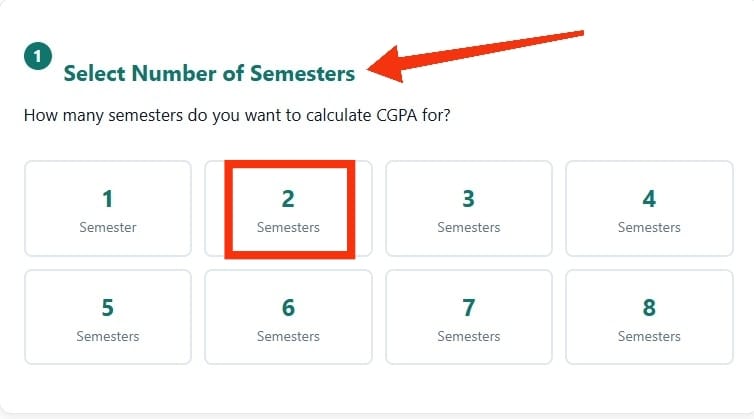
Select Number of Semesters
Choose how many semesters you want to calculate (1 to 8 maximum)
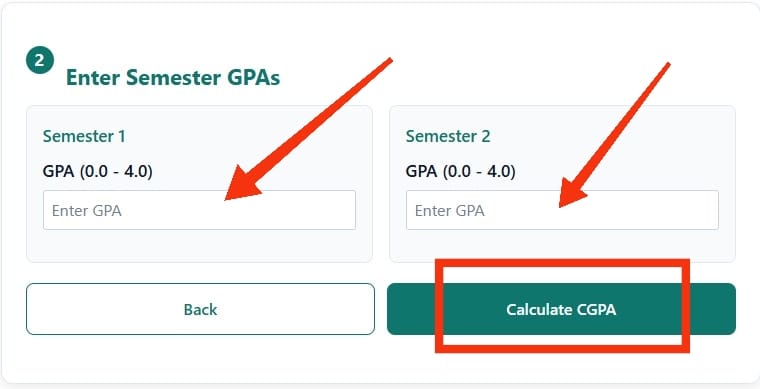
Enter Your Semester GPAs
For each semester, enter your GPA on the 4.0 scale. Make sure all GPAs are between 0.0 and 4.0. Use the back button if you need to change the number of semesters.
View Your CGPA Results
Press “Calculate CGPA” button and see your calculated Cumulative GPA instantly. Based on UAF’s standard 4.0 grading scale.
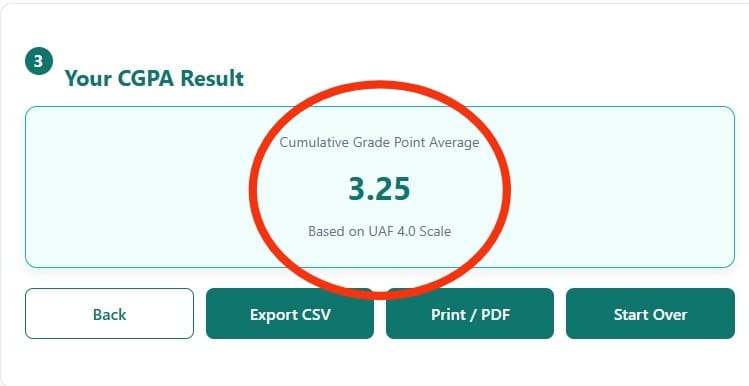
Export Options: Export to CSV for your records | Print/PDF for printing or saving
Benefits of Regularly Using the UAF CGPA Calculator
- Monitor Your Academic Progress
Regularly calculating your CGPA with the UAF CGPA Calculator helps you stay aware of your semester-wise performance. This insight allows you to make informed decisions and improve where necessary. - Set Realistic Academic Targets
Understanding your current CGPA enables you to establish achievable academic goals. It encourages consistent effort and helps you focus on improving your overall results. - Boost Career and Higher Education Opportunities
CGPA is often a key factor in placements, scholarships, and admissions. Keeping track of your academic performance ensures you meet eligibility criteria for future career and educational opportunities.
How UAF CGPA Calculator Work
The Cumulative Grade Point Average (CGPA) is calculated by taking the average of all semester GPAs.
Formula: CGPA = (Sum of all Semester GPAs) / (Number of Semesters)
UAF uses a 4.0 grading scale where:
- A = 4.0
- A- = 3.7
- B+ = 3.3
- B = 3.0
- B- = 2.7
- C+ = 2.3
- C = 2.0
- C- = 1.7
- D = 1.0
- F = 0.0
Frequently Asked Questions (FAQ)
What is the difference between GPA and CGPA in UAF?
GPA represents your Grade Point Average for a single semester, while CGPA is your Cumulative Grade Point Average across all completed semesters at UAF. GPA focuses on one semester’s performance, but CGPA provides an overall picture of your academic achievement throughout your degree program.
How can I download a UAF CGPA calculator app?
Currently, UAF doesn’t offer an official dedicated mobile app for CGPA calculations. However, several third-party online calculators and mobile-friendly websites provide UAF-specific CGPA calculation tools. Students can access these through web browsers on their mobile devices for convenient calculations.
Can I calculate my UAF CGPA using Excel?
Yes, you can create an Excel spreadsheet to calculate your UAF CGPA. Set up columns for course codes, credit hours, grades, and grade points. Use Excel formulas to multiply grade points by credit hours, sum the quality points, and divide by total credit hours to get your CGPA.
What does a 7.5 CGPA mean in percentage?
A 7.5 CGPA typically converts to approximately 71-75% in the UAF system, though the exact conversion may vary depending on the specific conversion method used by your faculty or program. Always consult your academic advisor or official university guidelines for precise conversions.
What is considered a good CGPA at UAF?
A good CGPA at UAF typically ranges from 3.0 to 4.0, with 3.5 and above considered excellent performance. However, specific requirements vary by program, scholarship criteria, and career goals. Check with your academic advisor about CGPA expectations for your specific field of study.